
VueMinder supports hierarchical tasks. Each task can have
zero or one parent task, and zero or more child tasks
(subtasks). For example, a complex task like building a home
addition could consist of subtasks such as acquiring a permit,
purchasing building materials, performing various phases of
construction, scheduling inspections, etc. All the subtasks feed
into the parent task, which is not considered completed until
all subtasks are finished. Some subtasks might depend on
completion of another subtask before that can begin, or might
have subtasks of their own. These relationships can all be
specified on the "Related Tasks" and "Start/Due" tabs of the
Task Editor, enabling a
complex hierachy of related tasks to be defined with very little
effort. The "Task Browser" window enables selection of related
tasks.
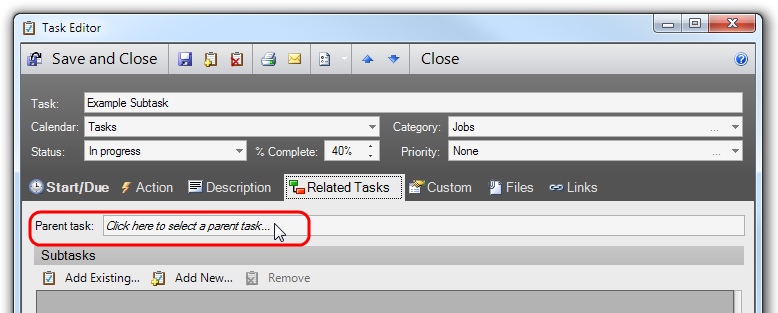
To select a parent task, click the "Parent Task" text field on the Task Editor. To select a subtask, click the "Add Existing" button under the Subtasks section on the Task Editor. In either case, the Task Browser window will appear enabling selection of the desired task. The list of tasks in the browser can be searched, sorted, and filtered, much like the Task List in the main window.

To select a task froim the Task Browser window, click the task's row and then click the OK button. The Task Editor will be updated to show the name of the selected task.
If you have questions that aren't answered here, you can reach our support team at support@vueminder.com. If you're using VueMinder Ultimate you'll have our top priority. Otherwise, we'll reply as soon as all VueMinder Ultimate requests have been completed (and always within 1 business day).